 Rusuban
How it works
A small computer that sleeps until something needs it, checks your accounts on a schedule, and turns everything outward into a card you approve.
Its own computer, asleep until needed
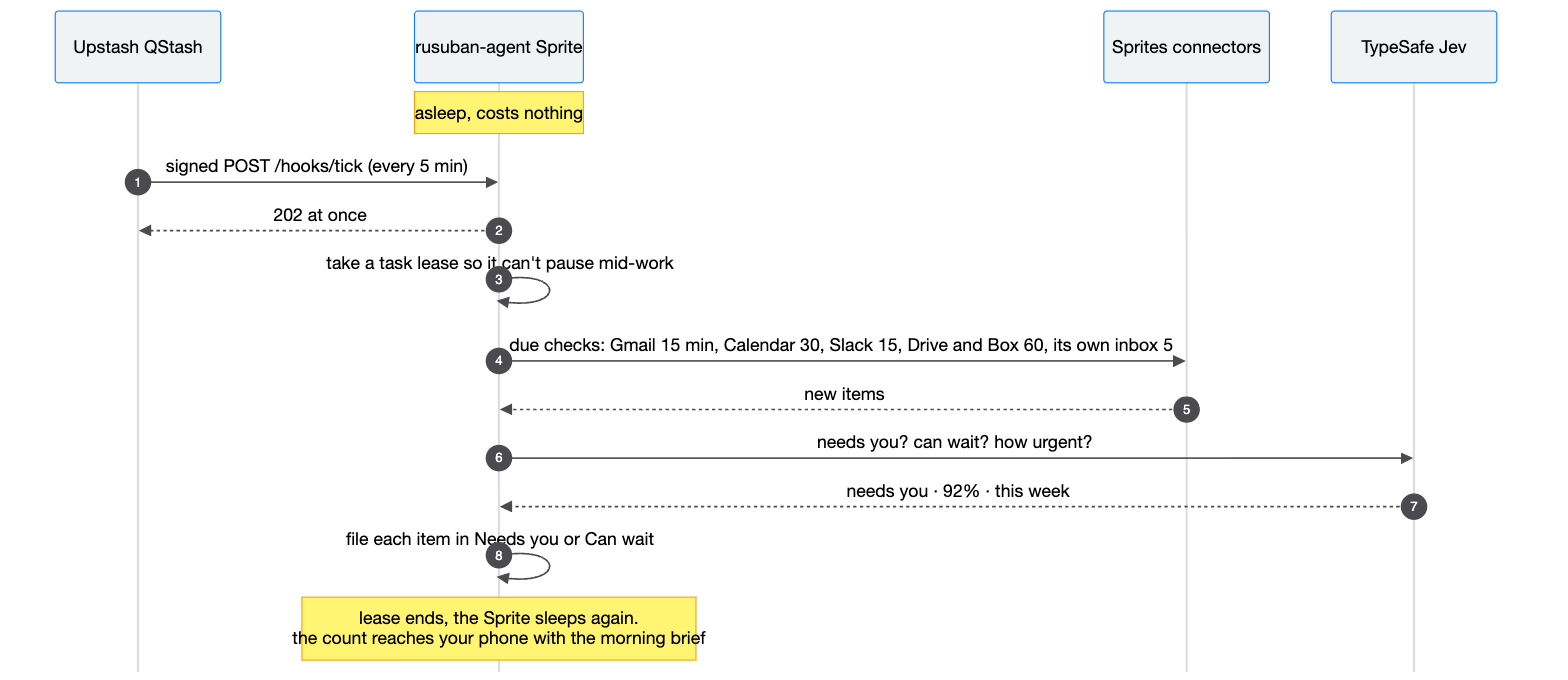
Rusuban runs on a Sprite, Fly.io's small always-there computer that sleeps when idle and wakes in a second or two when a request arrives. It keeps its database (SQLite) on its own disk, so nothing is lost while it sleeps. In the week these docs were written the developer's agent woke 304 times and slept in between.
Three things wake it:
| What | When |
|---|---|
| Upstash QStash | a signed tick every 5 minutes, so scheduled checks run even when no one has the app open |
| The app | any request from a paired phone or browser (and it drains due work right after answering) |
| The live view | the public feed on this site, polled every 20 seconds only while someone is looking |
While it works it holds a short task lease on its Sprite, so it is never paused halfway through a send.
Checking your accounts
Each source has its own check, which you can switch off or speed up on the Routines screen:
| Check | Default | First look-back |
|---|---|---|
| Gmail | every 15 min | 2 days |
| Slack (mentions and messages to you) | every 15 min | 2 days |
| Calendar | every 30 min | |
| Drive (files shared with you) | every hour | 2 days |
| Box (your folder and shared folders) | every hour | 2 days |
| Rusuban's own inbox (AgentMail) | every 5 min | |
| Money owed (Gmail) | every 6 hours | 90 days |
New items go to TypeSafe Jev, which answers a few plain questions about each one: does this need the owner, which bucket fits, how urgent is it. Code compares dates and amounts; Jev never does arithmetic. The result is your Needs you list and the morning brief.
Doing things, but only with your OK
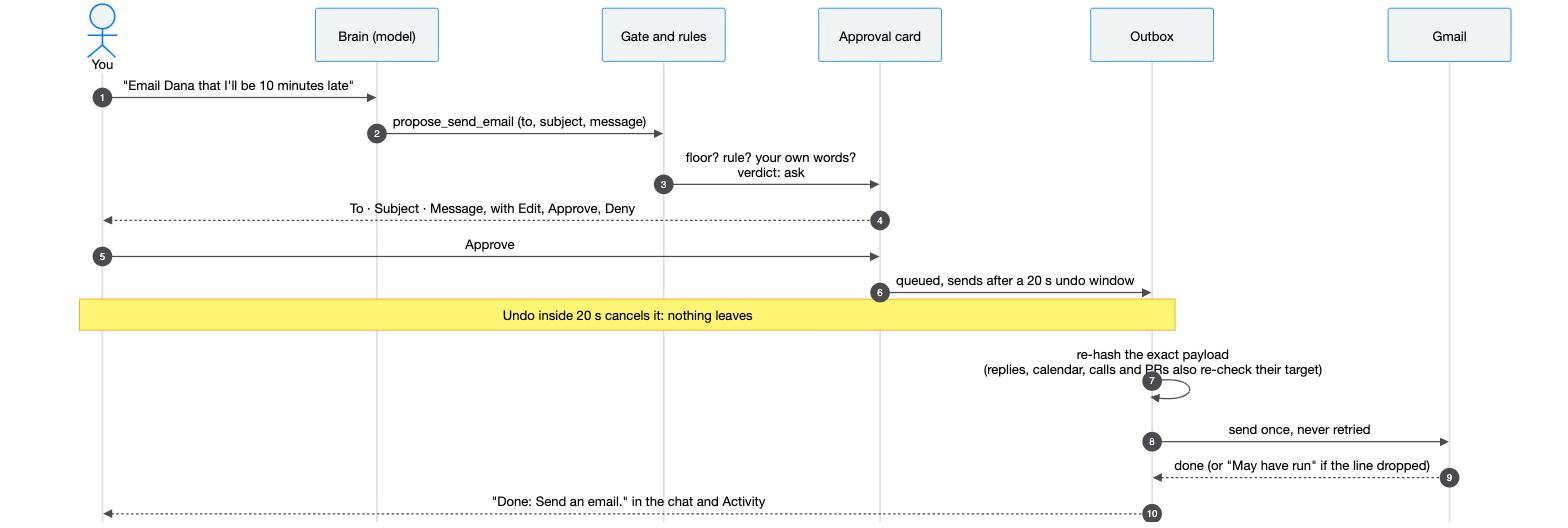
When you ask for something in chat, or a routine finds something to do, the model calls tools:
- Read tools run straight away: search Gmail, read a thread, check your calendar, search Drive, search and read the web, look up money cases and memory. Whatever they return is wrapped as untrusted data, with a random marker per run, so text in an email can't pose as your instructions.
- Propose tools never act. Each one makes an approval card and ends the model's turn.
- Internal tools only write Rusuban's own records: a watcher, a routine, a remembered fact, a code task in the sandbox.
The executor that actually sends is not a tool the model can call. It runs the exact payload you approved, once, after checking that nothing changed.
Keys never live on the Sprite
Every outside service is reached through a Sprites connector. The agent calls https://<gateway>/<provider>/… with a placeholder key, and the gateway adds the real key on the way out. Connectors are limited by Sprite label, so only your Rusuban Sprites can use them.
Provider API keys never sit on the Sprites. What does: QStash's signing keys (they can only verify a tick); the secret the agent and the workshop share to sign jobs (on both Sprites); the agent's own web-push key and Rewind signing key, in its database; and, if you sign Codex in with your ChatGPT plan, that sign-in on the workshop Sprite.
Two Sprites, one with no way out
Code tasks and mini-apps run on a second Sprite, the workshop. It has no GitHub, no mail, nothing that can send, push or pay: only the model, npm and the Sprites gateway. The agent fetches the repo for it and opens the pull request itself, after you approve the diff. Code tasks.